


Allstate Mobile
4.154.77K Reviews
App Specs
- Version
- 21.3.0
- Updated On
- License
- Free
- Downloads
- 10,000,000+
- Developer
- The Allstate Corporation
- Categories
- Finance
- Platform
- Android, iOS
Screenshots
 Analysis by AppCompare
I see Allstate Mobile as most useful when your insurance needs are already tied to Allstate: it brings routine policy tasks and moments of trouble into one place rather than asking you to hunt through paperwork. That convenience is its strongest argument. I’d recommend it to customers who want a mobile way to manage insurance, while keeping expectations grounded: an app can help you begin a claim or find assistance, but it cannot make a collision or a coverage decision effortless.
Where an insurer’s app earns its place
Allstate Mobile is a finance app from The Allstate Corporation, and its purpose is more specific than that of a general budgeting or banking tool. It is free, rated for Everyone, and its current version is 21.0.1. The app has an average rating of 4.1 from around 125,000 ratings, with more than 10 million installs. Those figures suggest broad use, but I would treat them as context, not a promise that every feature will suit every policyholder.
The practical benefit is having insurance information close at hand when a decision has to be made quickly. Before a trip, for example, I would check the policy details rather than assume I remember the right information. If a minor accident happens, having a claims route on the phone may make it easier to get started than searching for a paper card or calling without knowing what details to provide.
Useful habits before trouble starts
A good way to get value from an insurance app is to set it up while everything is calm. I’d sign in at home, review the policy information, and learn where the payment and claims options sit before needing them in a hurry. That small bit of preparation matters: roadside stress is a poor time to discover that you have forgotten a password or are unsure which screen to open.
For the Digital Locker, the most useful approach is to add items gradually instead of trying to document a whole home in one sitting. Clear photos and short descriptions are easier to maintain than a rushed inventory. I’d also keep the app’s records as a practical reference, not as a substitute for understanding the policy or retaining any documentation I may need elsewhere.
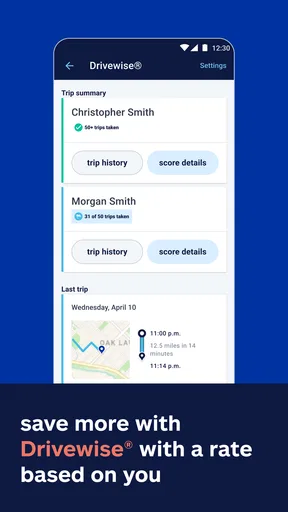
Drivewise may appeal to people who want feedback tied to their driving, but tracking habits is a personal trade-off. Before enabling or relying on it, I’d read the in-app explanation and decide whether the feature fits my comfort level and routine. A potential discount is appealing, yet I wouldn’t change safe driving habits or make assumptions about savings without checking the terms that apply to my account.
What it can and cannot replace
Compared with a general insurer’s website, a mobile app is more convenient when I’m away from a computer and need to check something from my phone. Compared with a multi-company insurance broker or comparison service, though, Allstate Mobile is naturally centered on Allstate rather than shopping across providers. If your main goal is comparing quotes, managing policies from several insurers, or organizing all household finances in one dashboard, another kind of service may fit better.
Worth Reading Before You Choose

Flipboard Shows What News Apps Must Do Beyond the Feed

Switching to Android Auto Means Rethinking Your Driving Routine

Google Calendar Makes a Crowded Week Easier to Manage

Ludo King Makes the Most of the Minutes Between Plans

Baby Panda World Brings Quick Play to Modern Phones, but Its Game Library Feels Busy

ESPN’s Live Game View Makes Following Close Games Easier
It also shouldn’t be treated as a complete substitute for speaking with an agent or claims representative. A digital claim flow can help you report what happened, and photos can provide useful context, but complicated damage, injuries, disagreements about responsibility, or unclear coverage can call for direct guidance. I’d use the app to begin and organize the process, then follow up with a person whenever the situation needs explanation or judgment.
Who will get the most from it
The best fit is an Allstate customer who wants everyday access to policy details, payments, claims, and driving-related tools without carrying a folder of insurance documents. It is especially useful for someone who drives regularly and would rather prepare a basic home inventory in small steps than start one after a loss. The app is less compelling if you are not an Allstate customer, prefer to handle insurance only through a person, or need one place to manage several companies’ policies.
On a normal day, the value may be modest: checking a detail before lending the car to a family member, taking a few minutes to record a new household purchase, or locating the claims area before a long drive. In an unexpected moment, those small preparations can reduce the number of things to remember. I would still keep essential policy information accessible in a way that works if my phone is unavailable, since relying on a single device is not a great plan during an emergency.
If you’ve ever wished for your insurance app to be as reliable as your favorite daily tools, the Allstate Mobile app might just be your new best friend. Let's dive into it together, and I'll tell you all about why this app has become a staple on my phone.
Your Insurance, Simplified
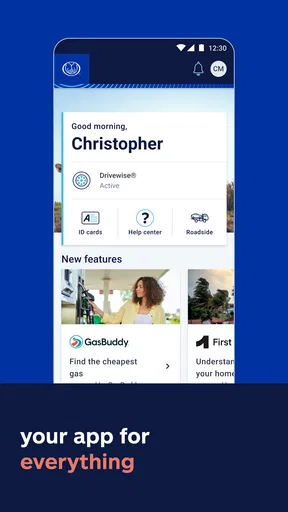
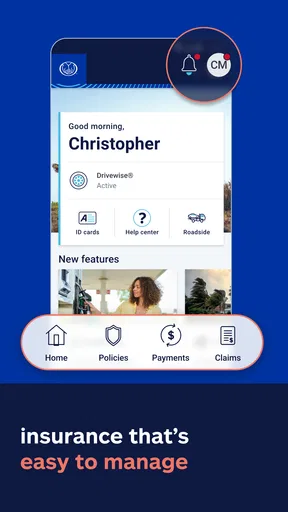
The first thing I noticed about the Allstate Mobile app is its sleek and intuitive design. From the moment you log in, the dashboard presents everything you need in an orderly fashion. It's like having a personal assistant for all things insurance-related. I mean, who wouldn’t want that, right?
With just a few taps, you can access your policy details, make payments, or even file a claim. The app takes the hassle out of managing insurance, which is a welcome relief for anyone tired of paperwork and phone calls. It’s almost like magic, and I’m here for it!
Features That Make Life Easier
One of my favorite features is the 'QuickFoto Claim'. Imagine getting into a fender bender and instead of stressing about the next steps, you simply snap a few photos of the damage directly from the app. It’s like having a claims adjuster in your pocket. This feature not only saves time but also gets your claim process started right away. Honestly, this is a game changer!
Then there's the 'Digital Locker'. If you’re anything like me, keeping track of all your belongings can be a bit of a nightmare. With this feature, you can catalog your possessions by uploading photos and descriptions. It’s super handy for when you need to account for your items, especially if you ever need to make a claim.
And let’s not forget the 'Drivewise' feature. For those of you who are all about safe driving, this is a nice touch. It tracks your driving habits and rewards you with discounts. Not only does it encourage safer driving, but it also feels great to save some cash just by being a responsible driver!
Navigation and User Experience
Now, let’s talk about the user experience. Navigating through the app is as smooth as butter. The developers clearly put a lot of thought into making it user-friendly. I didn’t have to fumble around trying to find what I needed. Everything is where you’d expect it to be, which I really appreciate. It’s like the app knows what you’re looking for before you even do.
Another thing to note is the consistent updates. It’s reassuring to know that the app is always improving and adapting to user needs. The developers seem to listen to feedback, which goes a long way in keeping the app relevant and reliable. I mean, who doesn’t love an app that actually listens to its users?
Security and Peace of Mind
Security is another big deal when it comes to insurance apps, and Allstate Mobile doesn’t disappoint. The app uses top-notch security measures to keep your information safe. Knowing that my data is secure gives me peace of mind, which is priceless in today’s digital age. It’s like having a digital fortress protecting your sensitive information.
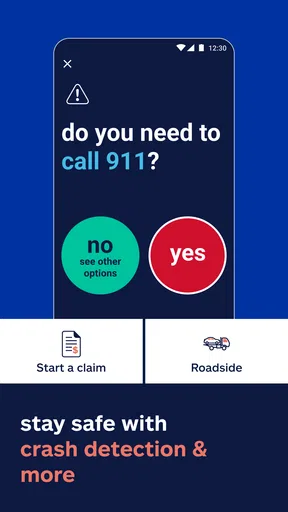
And if you’re ever in need of assistance, the app includes a handy roadside assistance feature. It’s reassuring to know help is just a tap away if you ever find yourself stranded. This feature alone makes me feel like I’m never truly alone on the road.
Final Thoughts
At the end of the day, the Allstate Mobile app is more than just an insurance tool. It’s a comprehensive platform that simplifies life’s unexpected moments. From quick claims to safe driving rewards, it’s designed with the user in mind. If you’re looking for an insurance app that’s reliable, intuitive, and just plain useful, give this one a try. Trust me, you won’t be disappointed!
A realistic claims-day workflow
Imagine coming back to a parked car and finding a fresh scrape, with no other driver around. I would first make sure the situation is safe, then use the app’s claim tools to start documenting what happened rather than trying to remember every detail later. The value of QuickFoto Claim is that taking pictures can be part of the first report; it does not mean the app instantly determines fault or settles the claim. For a more serious crash, I would prioritize safety and any necessary emergency help, then use the app when it is appropriate to do so.
For a roadside problem, the assistance option is most useful when you have already thought through the information you may need to provide, such as where the vehicle is and what help is needed. I would not assume that a button in an app removes the need to explain the situation or that every request follows the same path. Its advantage is having a route to assistance on hand, not a guarantee of a particular response time or outcome.
Small setup choices that pay off later
I would treat the app as a working folder rather than a one-time download. After a policy change or a new vehicle purchase, it is worth checking that the information shown still matches your current situation. For household records, photographing an item alongside enough context to identify it later is more helpful than collecting a stack of close-up images with no labels. A simple room-by-room habit can make the Digital Locker easier to keep useful without turning it into a weekend project.
There is also a sensible boundary between convenience and over-reliance. A phone can be lost, damaged, or out of reach, so I would keep a fallback way to identify my insurer and access important policy information. Likewise, before making a payment, I would pause to confirm I am in the account and policy I intend to manage, especially if I help with insurance for another household member. The app can streamline routine actions, but the user still needs to check the details.
Choosing it for the right reason
If you already have Allstate coverage, the strongest reason to install the app is not that every insurance task becomes effortless; it is that several useful tasks can be handled from one mobile starting point. It can be a practical companion for a driver who wants to be ready for a claim, a policyholder who prefers digital access to payment information, or a household that wants to build an inventory over time. If you only need to compare insurance prices, however, a comparison service is the more direct tool, and if you want personal advice on a complicated policy question, a conversation with an agent is the better first move.
My verdict is favorable with a clear condition: this is worth trying when you are an Allstate customer and will actually use its policy, claim, or driving tools. The useful parts are tied to preparation and access, rather than flashy extras. I would install it, take a few minutes to learn where the key options are, and decide thoughtfully whether features such as Drivewise suit my preferences. For someone outside the Allstate ecosystem, or someone who wants one neutral hub for every insurer, I would look elsewhere instead.
Pros
- User-friendly interface for easy navigation.
- Comprehensive insurance management features.
- Quick access to roadside assistance.
- Seamless claims submission process.
- Real-time updates on policy changes.
Cons
- Occasional login issues reported by users.
- Some features require strong internet connection.
- Limited customization of notifications.
- In-app support can be slow to respond.
- Certain features locked to specific policies.
FAQs for Allstate Mobile
What features does Allstate Mobile offer?
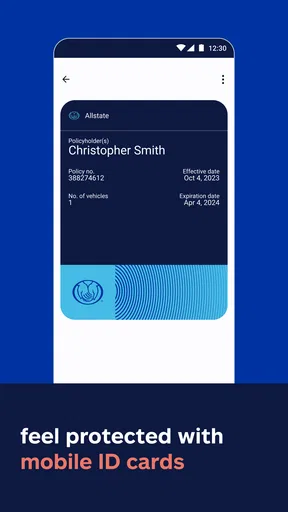
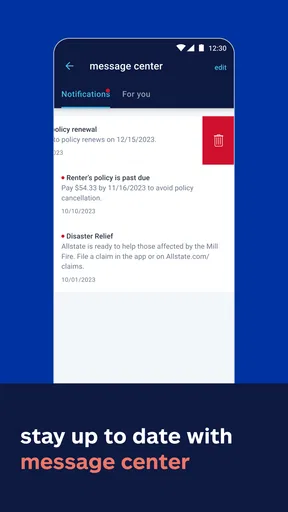
Allstate Mobile provides a variety of features designed to enhance user convenience and experience. Users can easily access their insurance ID cards, pay bills, and file claims directly from the app. Additionally, it offers roadside assistance, track driving habits with Drivewise, and provides alerts for policy updates. It's a comprehensive tool for managing Allstate insurance policies on the go.
Is Allstate Mobile available for both Android and iOS devices?
Yes, Allstate Mobile is available for download on both Android and iOS platforms. You can find it on the Google Play Store and the Apple App Store, ensuring compatibility with a wide range of smartphones and tablets, allowing you to manage your insurance needs from any device.
How secure is Allstate Mobile in handling personal information?
Allstate Mobile employs robust security measures to protect your personal information. The app uses encryption and secure login procedures to ensure that your sensitive data, such as insurance details and payment information, is safeguarded against unauthorized access, providing peace of mind for users concerned about privacy.
Can I file a claim directly through the Allstate Mobile app?
Yes, filing a claim is streamlined and efficient through Allstate Mobile. The app guides you through the process with easy-to-follow instructions, allowing you to upload photos, provide incident details, and track the progress of your claim. This feature simplifies what can often be a stressful situation for policyholders.
Does Allstate Mobile provide roadside assistance services?
Indeed, Allstate Mobile offers roadside assistance services. If you encounter a breakdown or other vehicle issues, you can request help directly through the app. Whether you need a tow, jump-start, or tire change, the app connects you with support to get you back on the road quickly.


